Showing posts with label SAMSUNG. Show all posts
Showing posts with label SAMSUNG. Show all posts
Sunday, October 13, 2013
TOP 20 BEST SMART-PHONES OF THE CENTURY

Saturday, October 6, 2012
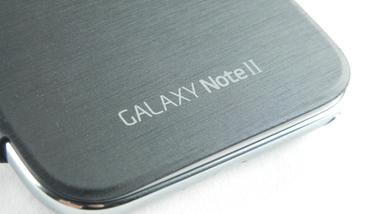
SAMSUNG GALAXY NOTE 2 N7100 REVIEW AND SPECIFICATIONS
SAMSUNG GALAXY NOTE N7100
SAMSUNG Galaxy note 2 (Samsung
Galaxy Note N7100) has all the features and components that a user may find to
be interested in. Its features are really mesmerizing. One may not find Galaxy
Note 2 boring. Because it is a smartphone as well as tablet from Samsung one
may simply believe it to be the best. No this is not true, since it has many
features embedded in it, it is considered the best. It has Android Jelly Bean
4.1 which is the latest from Android of course. It has 2GB RAM and 1.9 GHz
quad-core Cortex A9 processor. With a chipset of Exynos 4412 Quad-chipset and
400MP MALI Graphics, this device is like an illusion capable of conquering ones
mind and attracting one towards it. It supports both 3G (850/900/1900/2100
HSDPA) and 4G (LTE 700) network preferences. All its features like Camera,
Messaging, and Applications are astonishing and fabulous. For more such
specifications please view the next part of the post in which I have stated
about its specifications.
SPECIFICATIONS OF GALAXY NOTE II
1) 3G NETWORK – 850/900/1900/2100
HSDPA (21 mbps)
2) 4G NETWORK (Optional) - LTE 700
MHz CLASS 17 (100/50 mbps)
3) OPERATING SYSTEM – ANDROID 4.1
JELLY BEAN
4) PROCESSOR (CPU) – 1.9 GHz
CORTEX A9 QUAD CORE
5) CHIPSET – EXYNOS 4412
QUAD-CHIPSET
6) MEMORY - 2GB RAM, INTERNAL –
16/32/64GB
7) GRAPHICS (GPU) – MALI
8) WiFi – YES WITH 802.11 a/g/b/n
SUPPORT WITH DLNA AND WiFi HOTSPOT
9) BLUETOOTH – v4 A2DP, LE, EDR
10) GPS – YES WITH A-GPS AND
GLONASS SUPPORT
11) DISPLAY – 16-M SUPER AMOLED
CAPACITIVE TOUCH-SCREEN
12) RESOLUTION - 720 * 1280 Pixels
13) PRIMARY CAMERA – 8MP 3264 * 2448
PIXELS CAMERA WITH GEO-TAGGING,
TOUCH FOCUS, FACE AND SMILE DETECTION, IMAGE STABILIZATION
14) SECONDARY CAMERA – YES, 1.9MP
15) CARD-SLOT – YES, EXPANDABLE UP
TO 64GB
16) JAVA – YES WITH MIDP EMULATOR
17) SENSORS – ACCELEROMETER, GYRO,
PROXIMITY, COMPASS, BAROMETER
18) STAND-BY BATTERY
- UP TO 980 H (2G) / UP TO 890 H (3G)
19) TALKTIME BATTERY - UP TO 35 H
(2G) / UP TO 16 H (3G)
20) OTHER FEATURES - SNS
integration
- Active noise cancellation with dedicated mic
- Dropbox (50 GB storage)
- TV-out (via MHL A/V link)
- MP4/DivX/XviD/WMV/H.264/H.263 player
- MP3/WAV/eAAC+/AC3/FLAC player
- Organizer
- Image/video editor
- Document editor (Word, Excel, PowerPoint, PDF)
- Google Search, Maps, Gmail,
YouTube, Calendar, Google Talk,
- Active noise cancellation with dedicated mic
- Dropbox (50 GB storage)
- TV-out (via MHL A/V link)
- MP4/DivX/XviD/WMV/H.264/H.263 player
- MP3/WAV/eAAC+/AC3/FLAC player
- Organizer
- Image/video editor
- Document editor (Word, Excel, PowerPoint, PDF)
- Google Search, Maps, Gmail,
YouTube, Calendar, Google Talk,
Picasa integration
- Voice memo/dial/commands
- Voice memo/dial/commands
PRICE OF GALAXY NOTE 2:-
AROUND 600 EUROS OR RS.37900/- OR $ 810
AROUND 600 EUROS OR RS.37900/- OR $ 810


PROS AND CONS OF GALAXY NOTE II
PROS / ADVANTAGES OF GALAXY NOTE 2
1) 3100 Mah Battery gives the longest talktime.
2) Android Jelly Bean v4.1 is the latest version of
Android.
3) Super AMOLED display is regarded the best known display
4) 2GB RAM is more than enough for the phone
5) More than millions of applications to be downloaded
from.
CONS / DISANDVANTAGES OF GALAXY
NOTE 2
1) 8MP camera is not enough in this class of phone. Dual LED Flash is absent.
2) It cannot be used with one hand. The screen is wide
enough
3) Its large dimensions make it uneasy for portability
4) It’s a tablet-like more than a smartphone
5) Typing in it is not easy
WHERE TO PURCHASE SAMSUNG GALAXY
NOTE 2??
: -YOU CAN PURCHASE GALAXY NOTE 2 HERE(Grey color)


THANK YOU… THIS WAS ALL ABOUT
GALAXY NOTE 2. HOPE SO YOU WILL PUCHASE IT AS SOON AS POSSIBLE. AND PLEASE
COMMENT.

Monday, July 16, 2012
HOW TO GET RID OF CONNECTION ERROR IN SAMSUNG KIES?
HOW DO WE GET RID OF CONNECTION ERROR IN SAMSUNG KIES? HOW TO RESOLVE THAT KIND OF ERROR?LETS SEE-
Whenever we connect a Samsung Device to Kies after installing or at some moment we get an error message stating that Kies has been Unable to retrieve information about the Device.
If this happens we get so much disturbed that we somtimes end up re-installing kies instead of finding A solution.
SO here i am to give you a free solution on how to get fixed that "device unable to connect" error. Just follow these steps:-
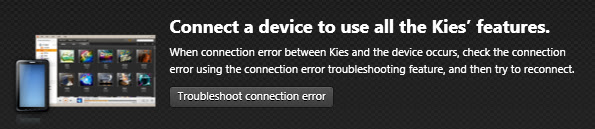
1) After installing , when connecting the device, after the error is shown, Just wait and then click to " TROUBLESHOOT CONNECTION ERROR" on the home screen.
2) If that button is not shown then you click on TOOLS> TROUBLESHOOT CONNECTION ERROR .
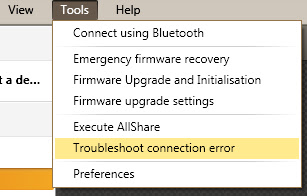
Then a screen will pop - up Showing that "Kies" May take several minutes to update the driver. So after the update of driver is complete you again re-start the application and the problem is fixed.
Whenever we connect a Samsung Device to Kies after installing or at some moment we get an error message stating that Kies has been Unable to retrieve information about the Device.
If this happens we get so much disturbed that we somtimes end up re-installing kies instead of finding A solution.
SO here i am to give you a free solution on how to get fixed that "device unable to connect" error. Just follow these steps:-
1) After installing , when connecting the device, after the error is shown, Just wait and then click to " TROUBLESHOOT CONNECTION ERROR" on the home screen.

2) If that button is not shown then you click on TOOLS> TROUBLESHOOT CONNECTION ERROR .

Then a screen will pop - up Showing that "Kies" May take several minutes to update the driver. So after the update of driver is complete you again re-start the application and the problem is fixed.
Friday, June 22, 2012
WINDOWS PHONE 8 Vs. ANDROID 4.0 Vs. iOS
Windows Phone 8 vs Android 4.0 vs iOS

When you look at the smartphone market today compared to just a few years ago, you'd be surprised at just how different it is. Today's smartphones are slowly taking on more features of PCs than phones – and none more so than the recent release of Windows Phone 8.
You could put this down to hardware, with high end phones such as the Samsung Galaxy S3 or HTC One X both powered by quad core processors, but the software is also continually evolving to support it.
iOS 6, Android 4.0 and now Windows Phone 8 are moving quicker than ever, constantly trying to out-do the others to gain more customers, but also to stay at the forefront of an ever-changing market.
Interface
 Windows Phone 8 builds upon the easy to recognise system of "Live Tiles". To those unfamiliar, these are squares placed on the home screen that represent different apps, such as a music player or for messaging, that are interactive.
Whilst remaining fundamentally the same, updates from the Windows Phone 7 interface now bring more customisable tiles, to allow you to squeeze even more onto your screen. Another major update sees the company bringing in data management via DataSmart, which perfect for those on limited contracts.
Android, however, provides interactivity through widgets that can be placed on varying home screens. Standard Android 4.0 defaults to five such screens, but customised overlays can boost this to seven. Android is also highly customisable, with different manufacturers offering their own take with skins atop the standard UI from Google.
Apple uses a tried and trusted formula, based upon simplicity. No widgets, no tiles, just a grid of app icons that you scroll through from the home page. Each iteration has added greater functionality, with iOS 6 strengthening Siri and even locking children out of certain areas.
Maps
Windows Phone 8 surprisingly ditches Microsoft's proprietary Bing Maps. On the other hand, its new system is hardly shocking. Windows Phone 8 now brings in the Nokia mapping system, bringing 3D street navigation, and Nokia's Navteq Traffic Service.

Android, somewhat unsurprisingly, bases its mapping system on the well known Google Maps, bringing Street View, 3D and indoor mapping. It provides the sat-nav experience for both pedestrians and motorists through the Navigation app, as well as details of local restaurants, cafés and attractions.
iOS has traditionally also based their mapping on Google's offering. This all changes with iOS 6, with Apple's new proprietary system providing turn by turn navigation, integration with Yelp for business listings, and Siri for voice control. Like the others, there are also 3D maps, a traffic service and a satellite view.
Traffic data is prevalent through all three, although Apple has taken this one step further by allowing anonymised croud-sourced data at the sites of traffic congestion to help you understand what's going on.
Camera
Microsoft hasn't skimped on Windows Phone 8's Camera app, getting a new simple, clean look, with a small menu button that accesses the camera's various settings. Nokia branded handsets are also set to bring over the PureView technology that was made famous in the Nokia 808 PureView.
Android 4.0's camera system brought in minor yet noticeable changes. It packs in varying scene modes, customisable levels white balance and exposure, all helping you to create your ideal shot. A panoramic mode and photo editing are also thrown in, alongside the impressive zero shutter lag.

iOS 6 builds upon the work from iOS 5, debuted on the iPhone 4S. Continuing the simplicity theme, settings are all sorted automatically, including whether the flash is used or not. Focus is also automatic, unless you specify a certain area by touching the screen. For those who require a physical shutter button, iOS also allows the use of the up volume button as well as the on screen option.
NFC
Windows Phone 8 packs in Microsoft Wallet, making use of any NFC technology packed into handsets. This is all set to tie in to varying applications installed on the phone, allowing payment via services such as Paypal. Other applications, such as instant pairing of Bluetooth accessories will also be supported.
Google also seems keen to use NFC, using services such as Android Beam and Google Wallet (currently only available in the US). The premier service allows for the instantaneous sharing of contacts, media and apps between two enabled phones, whilst the latter stores your card details to allow instant payment in stores.

iOS 6 brings in Passbook. Whilst not entirely a NFC based app, it does provide a lot of the same features, keeping varying tickets to sports, the theatre, airlines or store cards all in one easy to access, and constantly updated place.
We're expecting Apple to announce NFC capabilities in the iPhone 5 – given the fact rivals are all over the contactless technology,
Browser
Windows Phone 8 takes internet browsing very seriously, bringing the latest version of Internet Explorer, IE10. This will help keep WP8 at the forefront of the mobile internet browsing, but also keeps you safe whilst you do. IE10 comes with a phishing filter and SmartScreen service to make it harder for you to be tracked by malicious websites.
Internet browsing on Android is a different affair. The standard browser packs in some very cool security features, as well as the ability to save pages for offline reading and tabbed browsing. Also available is Google Chrome, which ports over many of the desktop features, as well syncing history and bookmarks as well as a slicker experience for Android 4.0 devices.

Safari on the original iPhone changed the level of acceptability from mobile browsing, and iOS 6 brings over more features such as offline reading and integration to iCloud allowing for tab syncing. Plus there are also Smart App Banners which help sites promote their apps, bringing a richer cohesion to the whole iOS platform.
Media
One area that Windows has suffered from before is microSD card support. Thankfully this is rectified in Windows Phone 8, as now Windows Phone 8 allows for media to be easily stored and accessed via a microSD card, as well as supporting the installation of apps onto it. Elsewhere is the support for 1280 x 768 and 1280 x 720 resolutions on top of the current 800 x 480.

Since Android 2.2, Apps to microSD has been a standard feature, as well as supporting stored media. Android 4.0 also offers a standard, clean-looking music player, and a basic video player that ties in deeply with downloads from the Google Play Store.
Google Music also gives a decent option for storing and accessing your music, and the likes of the Samsung Galaxy S3 build on the OS to support a fantastic range of video and audio formats too.
Believe it or not… the company that brought us the iPod also has media prevalent on its OS. It doesn't provide microSD support, but Apple has a habit of making devices with large internal storage to compensate.
Media is handled via both wired and wireless access via iCloud to the iTunes store, which has long provided music and films.
However, the screen size of the iPhone is still too small for extended movie watching, although the on-board audio support is among the best around for a music marathon on the way to work, be it on the iPad, iPod touch or iPhone.
Tablet support
Microsoft went out of its way to show off the new Microsoft Surface tablet, but this is running Windows 8. Whilst there is no word from Microsoft as to whether we will see a Windows Phone 8 Tablet, we would bet that it ties in strongly to Windows 8, as they are both based upon the same kernel to allow easy development on both.
As mentioned, Windows Phone 8 also now supports the 1280x768 resolution, so seeing a tablet running the mobile OS is not as far-fetched as it might once have been.
Android 4.0 was billed as the operating system that united both smartphone technology with tablet PCs. It took the best of 2.3 (Gingerbread) and combined it with 3.2 (Honeycomb) to provide a seamless experience that has been shown off well on the likes of the Asus Transformer Prime and there are even rumours of a Google Nexus tablet.

iOS also has a tablet…you may have heard of it… the iPad. Taking the world by storm since its release, the iPad has grown in popularity and is boosted by iOS 6 bringing Siri over from the iPhone 4S to the new iPad.
iOS 6 is scalable, but also basic in some people's eyes, as well as being too similar to the iPhone experience – se Windows Phone 8's compatibility with 'big' Windows could be a big selling point for those looking for a genuine, but compatible, difference between their tablet and smartphone.
Verdict
Windows Phone 8 builds upon the impressive foundations that its predecessor laid. Bringing over the much loved Live Tiles system, as well as supporting the next generation software, Microsoft has moved its ecosystem to the next level.
Android 4.0 was also a superb refresh of a now established mobile OS. It brings some impressive features, including the multitasking options prevalent on Android 3.2. However with iOS devices selling in record numbers, it's hard to see that dominance being shaken too dramatically any time soon.
Building Android 4.0 from the ground up means that Google has that chance, especially by targeting the budget end of the market, but one factor key to Apple's success is its business market. Tight integration of Windows Phone 8 with Windows 8 could provide a strong platform for Microsoft to continue to stay competitive in a computing market that has seemingly begun to leave it behind.
Sunday, May 27, 2012
SAMSUNG GALAXY S3 REVIEW / SPECIFICATIONS
SAMSUNG GALAXY S3 REVIEW AND SPECIFICATIONS

When we get a product for
review it’s great to test to the limits, although we’re also very careful to
make sure we look after these devices, especially when they’re something that
looks beautiful from a gadget perspective. This is completely where some
reviewers disagree and has been seen with a Samsung Galaxy S3 review, which the
video author wants to have a smashing good time.
GALAXY S3 SPECIFICATIONS
GENERAL
2G Network - GSM 850 / 900 / 1800 / 1900
3G Network - HSDPA 850 / 900 / 1900 / 2100
4G Network - LTE (regional)
Announced - 2012, May
Released - 2012, May
BODY
Dimensions - 136.6 x 70.6 x 8.6 mm
Weight - 133 g
With Touch-sensitive controls
DISPLAY
Type - Super AMOLED capacitive touchscreen, 16M colors
Size - 720 x 1280 pixels, 4.8 inches (~306 ppi pixel
density)
Multitouch - Yes
Protection - Corning
With TouchWiz UI v4.0
SOUND
Alert types - Libration; MP3, WAV ringtones
Loudspeaker – Yes with 3.5mm jack
MEMORY
Card slot - microSD, up to 64 GB
Internal - 16/32/64 GB storage, 1 GB RAM
DATA
GPRS - Class 12 (4+1/3+2/2+3/1+4 slots), 32 - 48 kbps
EDGE - Class 12
3G SPEED - HSDPA, 21 Mbps; HSUPA, 5.76 Mbps
WLAN - Wi-Fi 802.11 a/b/g/n, DLNA, Wi-Fi Direct, Wi-Fi
hotspot
Bluetooth - Yes, v4.0 with A2DP, EDR
NFC - Yes
USB - Yes, microUSB v2.0 (MHL), USB On-the-go
CAMERA – Primary 8 MP, 3264x2448 pixels, autofocus, LED
flash
CAMERA Features:-
Simultaneous HD video and image recording, geo-tagging,
touch focus, face and smile detection, image stabilization
VIDEO - Yes, 1080p@30fps
SECONDARY CAMERA - Yes, 1.9 MP, 720p@30fps
SOFTWARE SPECS
OS - Android OS, v4.0.4 (Ice Cream Sandwich)
CHIPSET - Exynos 4212 Quad
CPU - Quad-core 1.4 GHz Cortex-A9
GPU – Mali
Sensors - Accelerometer, gyro, RGB sensor, proximity,
compass, barometer
Messaging - SMS (threaded view), MMS, Email, Push Mail, IM,
RSS
Browser - HTML, Adobe Flash
Radio - Stereo FM radio with RDS
GPS - Yes, with A-GPS support and GLONASS
Java - Yes, via Java MIDP emulator
Colors - Pebble blue, Marble white
OTHER FEATURES :-
- MicroSIM card support only
- S-Voice natural language commands and dictation
- Smart Stay eye tracking
- Dropbox (50 GB storage)
- Active noise cancellation with dedicated mic
- TV-out (via MHL A/V link)
- SNS integration
- MP4/DivX/XviD/WMV/H.264/H.263 player
- MP3/WAV/eAAC+/AC3/FLAC player
- Organizer
- Image/video editor
- Document editor (Word, Excel, PowerPoint, PDF)
- Google Search, Maps, Gmail,
YouTube, Calendar,
Google Talk, Picasa integration
- Voice memo/dial/commands
- Predictive text input (Swype)
Standard battery, Li-Ion 2100 mAh
STAND-BY - Up to 590 h (2G) / Up to 790 h (3G)
TALK TIME - Up to 21 h 40 min (2G) / Up to 11 h 40 min (3G)
MISC –
SAR US
SAR EU - 0.21 W/kg (head)
TESTS
DISPLAY
CONTRAST RATIO: Infinite (nominal) / 3.419:1 (sunlight)
CONTRAST RATIO: Infinite (nominal) / 3.419:1 (sunlight)
LOUDSPEAKER
VOICE 75dB / Noise 66dB / Ring 75dB
AUDIO QUALITY
NOISE -90.3dB / Crosstalk -92.6dB
PRICE:- Around Rs. 36,900 or 540 Euros
Subscribe to:
Posts (Atom)